In three months, my Cursor bill quadrupled.
Not because prices went up. Just because I’m using a lot more.
For the past two years, the basic $20 plan was always enough.
But since Claude Opus 4.6, things have changed:
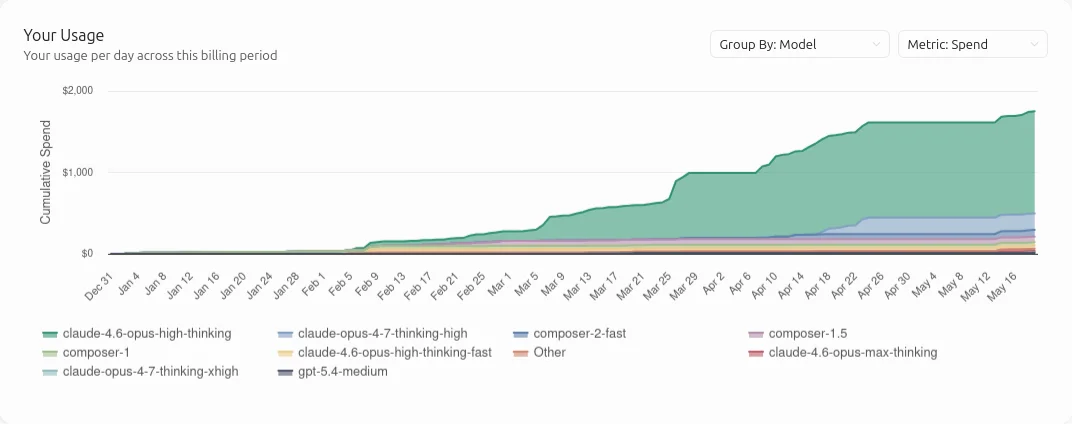
- In February, I moved to the $60/month plan, and I blew through it with an extra $84 of usage on top.
- In March, I went up to the $200/month tier, and it still wasn’t enough. $210 of overage at the end of the month.
- In April, I opened a second account at $200 to get even more tokens. Even then, I went over. Final April bill: $580.
Was it worth it? 100% yes. No doubt about it.
But that’s not the question. The question is: when does this runaway increase stop?
So I hit pause.
Not to cancel. To understand where the money was going.
Why do some prompts burn 50,000 tokens, while others burn several million?
What’s the difference between “Input”, “Output”, “Cache Read”, and “Cache Write” tokens?
If I wanted to cut my bill, I had to understand first.
In this article, we’ll see how it works:
- Understanding why all tokens don’t cost the same
- The key mechanism: you pay for the same tokens multiple times within a single prompt
- The changes I made in my workflow to reduce token usage
- Going further: auditing your baseline
1. Understanding why all tokens don’t cost the same
Every time you send a prompt to an LLM, you pay for two types of tokens:
- Input tokens: what you send to the model.
- Output tokens: what the model sends back.
These two types are priced differently. Rates are usually shown per million tokens.
For example, for the Claude 4.7 API:
- Input tokens: $5 per 1 million tokens
- Output tokens: $25 per 1 million tokens
Every API has its own pricing, depending on the provider and the model.
In Cursor, the input includes not just what you type in the prompt, but also:
- Cursor’s system prompt (the agent’s base instructions)
- The descriptions of rules, skills, MCPs, and plugins
- The files you attach, or the ones the agent reads on its own
- The results of the tool calls the agent triggers
And the output is everything the model sends back:
- The text displayed in the chat
- The code blocks inserted into files
- The arguments passed to tool calls
- The “reasoning” it runs internally (for thinking models)
So far, so good.
The hidden mechanism: Cache Write and Cache Read
There are two other, slightly trickier categories.
Providers like Anthropic and OpenAI offer a prompt caching mechanism. When you send a long context to the model, the API can store it temporarily (5 minutes or 1 hour with Anthropic) so the next requests don’t have to reprocess it from scratch.
Concretely:
- Cache Write: the first time a context block is sent, it’s processed and cached. It’s slightly more expensive than a regular input (x1.25 or x2 depending on storage duration), but you only pay for it once.
- Cache Read: on every subsequent call that reuses that block, it isn’t reprocessed, just read back from the cache. And there, the price drops to 10 to 25% of an input token, depending on the provider.
In short: thanks to these caching mechanisms, you pay full price once, and then a heavily discounted price for every subsequent use.
In practice, this is where everything plays out.
Token volumes
Looking at my own token usage over the last few days:
| Category | Volume | % of total |
|---|---|---|
| Input (with Cache Write) | 9.6M | 7% |
| Input (without Cache Write) | 8.5M | 6% |
| Cache Read | 111M | 85% |
| Output | 1.3M | 1% |
The conclusion is obvious: Cache Reads dominate the volume by a wide margin.
Even at 10% of the price, their weight on the bill ends up exceeding everything else combined.
That left me with one simple question:
How can a single request rack up millions of tokens?
The answer lies in a concept I hadn’t really internalized: the “turn”.
2. The key mechanism: you re-pay the same tokens at every turn
We tend to think “one prompt” = one API request.
When I open Cursor’s chat, I type a prompt, and the agent replies.
Behind the scenes, Cursor takes my prompt, assembles it with its system prompt and a few other bits, and sends it to the Claude API.
One prompt.
But potentially several exchanges with the model through the API.
One prompt = several “turns”
A turn is one round trip with the model’s API.
As long as the agent can answer directly, it stays a single turn.
But as soon as it needs to go fetch information from the outside world:
- read a file,
- run a command,
- do a
grep,
a new turn is required.
The flow is always the same:
- The model emits a reply that includes “I want to use this tool with these arguments” (a tool call)
- Cursor runs the tool locally (file read, shell command, etc.)
- The result is sent back to the model in a new API call, so it can keep going.
Between steps 1 and 3, there’s a new API call. Billed.
Every turn sends everything back
This is where things get critical.
When I talk to a human, I don’t need to repeat the entire conversation every time I say something. They remember what came before.
An AI agent doesn’t work that way. It has no memory. It just receives a context as input, and predicts what comes next.
Even the AI providers’ so-called memory systems are just smoke and mirrors. They’re really just a text file that gets maintained and re-injected into the context every time.
In the same way, when the model receives a tool result to continue, the API doesn’t just get the new result. It gets the entire history. Not just what changed since the last turn. Everything.
Let’s look at a concrete example.
Turn 1
I write the following prompt in a fresh conversation:
“Commit the fix I just implemented.”
The agent replies:
“I’m checking the repo state and the diff to prepare the commit for the fix.”
And it triggers 4 tool calls:
- Read the git-standards.mdc rule
- Run command:
git status - Run command:
git diff && git diff --staged - Run command:
git log -5 --oneline
For this turn, I’m billed on the input for the prompt I wrote plus Cursor’s system prompt.
And on the output, I’m billed for the agent’s written reply, plus the tool calls it emitted.
Turn 2
The agent isn’t done, so it keeps going. Thanks to the tool calls, it has gathered the context it needs to make the requested commit.
New API request, but this time the input is much fuller: my prompt, the system prompt, the agent’s reply text, and the contents of the 4 tool calls.
The agent replies:
“The fix handles
NApost bodies in the card preview. I’m only committing that file, not the untrackedscripts/folder.”
And it triggers one more tool call:
- Run command:
git add xxx && git commit -m "yyy" && git status
End of the turn.
Turn 3
The agent has to wrap up its reply and tell me what was done.
Yet another API request with: my initial prompt, the system prompt, the agent’s 1st reply, the contents of the first 4 tool calls, the agent’s 2nd reply, and the output of the last tool call.
And the agent writes its final reply:
“Commit created on
dev/charles. Blah blah.”
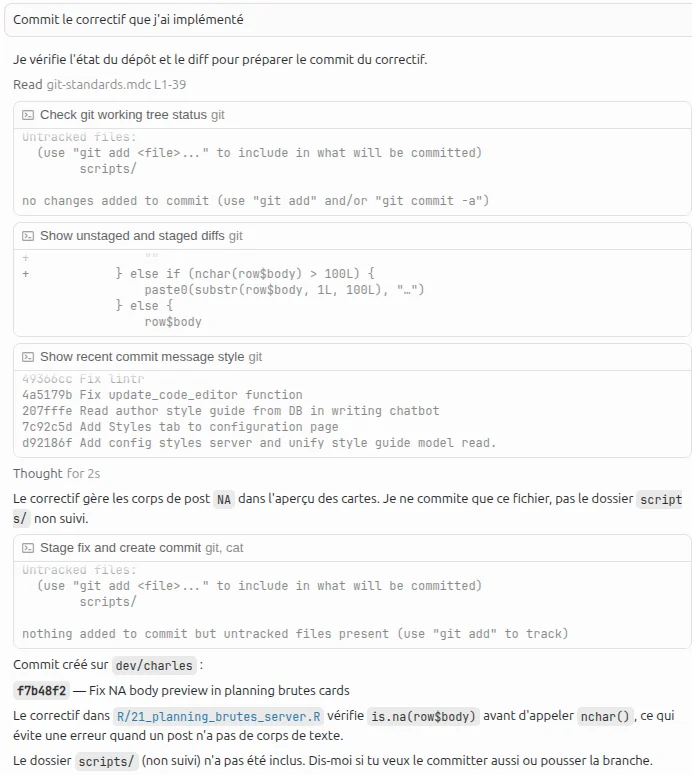
1 prompt = 3 turns
In the end, this simple prompt triggered three API calls. On each call, the context is bigger and bigger, because it contains everything that happened before.
In this example, I started a new conversation. But you can already see that the longer a conversation lasts, the more each prompt is going to burn a serious number of tokens.
According to Cursor, my conversation contains 18,200 tokens of context.
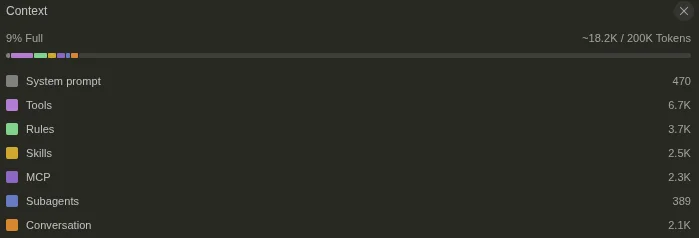
Yet I was billed for 52,485 tokens.

Why? Because there were 3 turns, so 3 API requests.
18,200 x 3 = 54,600, which roughly matches. Not exactly, because each turn is a bit different from the others, and the billed tokens are split between input and output, but the order of magnitude is there.
Parallel vs. serial
This mechanism has a direct consequence on how the agent works.
A good agent batches independent tool calls into the same turn.
If it needs to read 5 files with no dependencies between them, it asks for them all at once in its reply: “read me A, B, C, D and E.”
Cursor runs the 5 reads in parallel, and on the next turn the agent receives the 5 results in a single block to keep going.
5 tool calls in parallel = 1 extra turn.
A less skilled agent chains them one after another. It asks for A. Waits for the result. Then decides to read B. Waits. Then C. And so on.
Every new read is an extra turn, so a new API request, with all the accumulated history replayed in the input.
5 tool calls in serial = 5 extra turns.
Same final result, but the bill explodes.
Why two requests can cost twice as much
With this mechanism in mind, the gap between a 50,000-token prompt and a multi-million-token one stops being mysterious. It comes down to two things:
- how many turns the agent had to do to answer me,
- and how fast the context grew at each turn.
A “light” prompt is a few well-batched turns, over a context that stays small. A “heavy” prompt is an agent forced to chain its reads serially, where each new turn drags an ever-growing history.
Once you see it this way, you look at your usage differently. And more importantly: you start to see where you can act.
3. The changes I made in my workflow to reduce token usage
The changes below took my bill from $580 to “only” $400. That means my 2 accounts are now enough, without having to buy additional capacity.
It’s still high, but it’s a roughly 30% drop, which is significant considering the previous months had been steadily climbing.
Often start a fresh conversation
By far the most impactful lever.
Earlier this year, there were days where I burned 25% of my total usage in a single day. I couldn’t figure out why.
Today the answer is crystal clear:
- I was using “Opus 4.6” in MAX mode. MAX mode expands the context window from 200k to a maximum of 1 million tokens.
- And I was dragging conversations out way too long.
The results were great. The agent had all the context it needed.
But if you paid attention to the previous section, you can already see this was the perfect recipe for burning tokens by the millions.
Now, I start a fresh conversation whenever I get the chance.
Concrete example: I don’t know why, but AI agents tend to forget accented characters, or replace them with their Unicode codepoints. They write \u00e0 instead of à.
Before: I’d add a prompt in the current conversation telling it to stop butchering accents.
After: I create a new conversation to tell it the same thing. There’s no point dragging the entire conversation context into a task this dumb and mechanical.
Potentially millions of tokens saved on an ultra-simple task.
Heads up: thinking time ≠ prompt cost. Our natural instinct is to think: the longer the agent takes to reply, the harder the prompt, and therefore the more it’ll cost.
Not at all.
In the previous example, the prompt in the new conversation is actually slower: the agent starts from zero. It has to search for every \uxxx character, then replace them.
Whereas in the ongoing conversation, it’s much faster: the agent knows exactly where the occurrences are because it just wrote them. They’re in its context.
Despite that, the new conversation is more economical. The context is far more condensed, so fewer tokens consumed.
One planner agent to rule them all
I make heavy use of the agent planning feature in Cursor. The plan lets me refine my need, anticipate complexities, and make sure the AI agent isn’t going to do anything stupid.
Before: I’d ask the agent to draft a plan. Then execute the plan. Then iterate on whatever it messed up.
After:
- I ask an agent to draft a plan. I refine the plan.
- For each task in the plan, I delegate it to a new agent (the Build in New Agent feature)
- The new agent starts in a fresh conversation.
The upside is that each sub-agent has exactly the context it needs: the plan.
It ties into the previous point. We’re in a new conversation, with limited but high-quality context.
Pick the right model for the right task
Not all models cost the same.
In Cursor, not all models are even billed on the same line. A subscription gives you two types of usage:
- External APIs (Claude, Codex, etc.)
- Cursor’s own model: Composer
In my subscriptions, it’s mainly external API usage that I max out. My Composer usage stays around 5-10% of the total capacity I’m given.
So the trick is to use Composer as much as possible.
The catch? It’s much less smart than Claude.
My rules:
Use Composer for dumb or repetitive tasks: for example, it’s the perfect model for making a commit. That kind of task needs several tool calls and the previous conversation’s context.
I have a lot less trouble using Composer inside an existing conversation, since I’m not using it at full capacity.
When in doubt, try Composer first: even for simple questions, Composer manages to mess up or bullshit me. But I try anyway. If it can help, great. If it can’t, I start over with Claude.
For repetitive but not-too-dumb tasks, use Sonnet: in my opinion, Sonnet is still better than Composer, and always cheaper than Opus. If I need to apply a pattern adapted to my codebase, I’ll go with Sonnet. It’s simple, repetitive, but I don’t trust Composer enough.
4. Going further: auditing your baseline
Everything we’ve seen so far targets the dynamics of the conversation: how many turns, what context size, which model. That’s where the gains are most impactful.
But there’s another important layer: the baseline. What Cursor sends to the model before you’ve typed anything at all:
- The system prompt
- The tool descriptions
- The rules
- The skills
- The MCPs
This baseline is always there.
And as we saw in the previous sections: it’s re-sent on every turn of every prompt.
Looking at my Cursor stats, I’ve made 343 prompts over the last 7 days. If we assume an average of 5 turns per prompt, that means this baseline was sent to the API 1,715 times.
So you quickly realize that if you can shrink the baseline, even by a few thousand tokens, it can save millions of tokens by the end of the month.
The “Hello” benchmark
To measure, you need a protocol.
Mine:
- I open a new conversation.
- I select Claude Opus 4.6 + Thinking (the model I use for complex code).
- I type the prompt: “Hello”.
And I note the number of tokens used.
With my initial setup, this simple “Hello” sent 28,358 tokens to the model. Before Claude had written a single character back.
What makes up this baseline
By asking my agent to introspect its own system prompt, I was able to break those 28K down into seven layers:
| Layer | Estimate | User control |
|---|---|---|
| Cursor core system prompt | ~4-5K | None |
| Tool descriptions (Shell, Read, Grep, ~20 tools) | ~10-14K | Partial |
| Global rules | ~500-800 | Full |
| Cursor skills | ~1-2K | Partial |
| Plugin skills | ~1-2K | Full |
| Active MCPs | variable | Full |
| Environment context (open files, terminals) | ~500-1K | Partial |
I have basically no impact on a big chunk of the baseline.
The tool descriptions are a JSON descriptor sent to the model. It tells the model what’s available, what it does, and how to use it.
The rest is stuff I’ve stacked up over time. And there, we can cut.
Three passes, -27%
I did three successive passes, re-running the “Hello” benchmark between each.
Pass 1: Cut what I don’t need all the time
I had 3 active MCP servers:
- A homemade one to access internal knowledge
- One for Svelte that I only use in one project
- One for Excalidraw, which I also use very sporadically
I also had a datachamp.mdc rule that provides context about the agency, to avoid repeating it to the AI agent every time.
These tools are useless 99% of the time, but loaded 100% of the time.
I just needed to disable them. And remember to re-enable them when I need them.
Pass 2: Tweak Cursor settings
I went through every settings menu and, for each option, tested before/after to see if it had an impact on prompt usage.
Result:
| Option disabled | Savings |
|---|---|
| Browser Automation | -1,700 tokens |
| Web Search Tool | -200 tokens |
| Web Fetch Tool | -100 tokens |
| Indexed docs | -400 tokens |
Browser Automation, I never use it.
“Web Search Tool” and “Web Fetch Tool” are more useful for me. But here too, I can turn them on when I need them, and leave them off the rest of the time. Honestly, for 300 baseline tokens, I could leave them on.
And the indexed docs were old package docs I had added at some point. Since I removed them, I haven’t really noticed a difference.
Pass 3: Cursor skills
Cursor ships with default skills: create a hook, configure a status line, create a rule, etc.
Each skill adds a few hundred tokens to the baseline. Out of the dozen installed by default, I was only using 3 or 4.
I went into my config files and removed what could be removed.
The final recap:
| Step | Baseline |
|---|---|
| Initial | 28,358 |
| Pass 1 (MCPs, Figma plugin, datachamp rule) | 23,500 |
| Pass 2 (Cursor toggles) | 21,100 |
| Pass 3 (5 skills removed) | 20,700 |
| Final | -27% with no loss of quality |
You can tell each pass is a bit less impactful than the previous one. We could probably go even further, but the returns shrink, and we’d start sacrificing useful features.
If I redo my earlier math, I’m saving 7,658 tokens per turn here.
With 343 prompts per week, and 5 turns per prompt, I’m saving 13 million tokens per week, or about 50 million tokens per month.
On a base of around 1 billion tokens per month, that’s 5%. Not nothing, but not revolutionary either.
What this really changes
Beyond the token savings, this exercise mostly helped me actually understand how the billing works.
Before, I’d look at my token usage without grasping it.
I’d see 3 million tokens burned on fixing syntax errors, and I didn’t get it.
Meanwhile, I’d ask complex architecture questions and get incredible answers for 300,000 tokens.
Now, I can anticipate the cost of my prompt. When I see the AI agent chaining tool calls one after another, without batching them, I get that little drop of sweat because I know it’s going to hurt.
In the long run, we all know prices are going up. Providers are in a land-grab mode, and there’s a compute shortage that may get worse in the coming years. Mastering these billing mechanisms today is critical.
Comments